
Vra7
 Written by Sam McGeown
on 19/12/2016
Written by Sam McGeown
on 19/12/2016One of the cool new features released with vRealize Automation 7.2 was the integration of VMware Admiral (container management) into the product, and recently VMware made version 1 of vSphere Integrated Containers generally available (GA), so I thought it was time I started playing around with the two.
In this article I’m going to cover deploying VIC to my vSphere environment and then adding that host to the vRA 7.2 container management.
Written by Sam McGeown
on 18/11/2016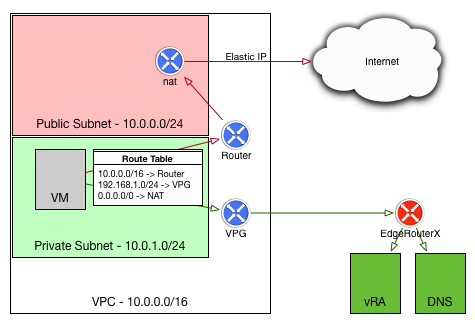
Recently I’ve been working on some ideas in my lab to leverage the AWS endpoint on vRealize Automation. One of the things I needed to get working was getting Software Components working on my AWS deployed instances.
The diagram to the right shows my end-stage network - the instance deployed by vRA into AWS should be in a private subnet in my VPC, and should use my local lab DNS server and be able to access my vRA instance. This allows me to make use of the vRA guest agent for software components on the deployed VMs. I also wanted to have the deployed VMs use their local NAT gateway for internet traffic, rather than paying for the data over my VPN connection.
Written by Sam McGeown
on 30/3/2016<img class=“alignright size-thumbnail wp-image-6186” src="/images/2015/07/vRA-Product-Icon-Mac_0.png" alt=“vRA” width=“150” height=“150” - a properties object.
I wanted to create a workflow that I could enable to log all of the keys, values and types of the properties object for each stage of the vRA7 MachineProvisioning workflows, and create a reference for myself on the payload for each stage.
To do this I created a new workflow “debugProperties” and added an input variable called “payload”, type Properties. Next I added a single scriptable task and cycled through the properties. Some of the properties’ values are actually other properties objects, so there’s a function to test the type and iterate through if required.
Written by Sam McGeown
on 9/3/2016The new Event Broker service in vRA7 is one of the most exciting features of this latest release, the possibilities for extensibility are huge. At this point it time you can still use the old method of using workflow stubs to customise machine lifecycle events, but at some point in the future this will be deprecated and the Event Broker will be the only way to extend.