

Warning: This article is now 13 years old! It is highly likely that this information is out of date and the author will have completely forgotten about it. Please take care when following any guidance to ensure you have up-to-date recommendations.

Save the QuizMe.ps1 file into a folder and then place one or more text file in the same folder containing a comma delimited set of questions and answers. Then run QuizMe.ps1!
You can choose the quiz you take (which text file it will use).

This will work for anything you want to quiz yourself on, it’s not limited to VMware configuration maxiums.
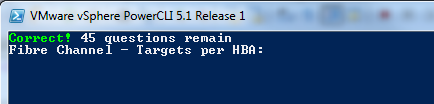
QuizMe.ps1
$QuizFiles = Get-ChildItem . | where {$_.extension -eq ".txt"}
Clear-Host
Write-Host "Choose a quiz file" -fore Yellow
foreach ($QuizFile in $QuizFiles) {
	Write-Host "$QuizFile"
}
$Quiz = Read-Host -Prompt "Type a file name"

$VMM = Import-CSV $Quiz -Header "Question","Answer"
Clear-Host
$Count = 10
while ($Count -gt 0) {
	if(($VMM).GetType().ToString() -eq "System.Object[]") {
		$Q = Get-Random $VMM
	} else {
		$Q = $VMM
	}
	$Question = $Q.Question
	$Answer = Read-Host -Prompt $Question
	Clear-Host
	if($Answer -match $Q.Answer) {
		Write-Host "Correct!" -Fore Green -NoNewLine
		$VMM = $VMM | where {$_.Question -ne $Q.Question}
	} else {
		Write-Host "Wrong - "$Q.Answer -Fore Red -NoNewLine
	}
	$temp = $VMM
	if($temp.count -eq $null) { $Count-- } else { $Count = $temp.count }
	Write-Host " $Count questions remain"
}
Download quiz files: VirtualMachineMaximums ESXi5Maximums